Interoperability & Mapping Guide
Using PublicSchema as a Rosetta Stone to map fields and codes between systems, build data exchanges, and consolidate records.
This guide is for teams connecting existing systems: mapping fields between platforms, building data exchanges, consolidating records from multiple sources, or running ETL pipelines. PublicSchema acts as a shared reference point (a Rosetta Stone) so that each system only needs one mapping instead of a mapping to every other system.
Contents
- When to use this approach
- The Rosetta Stone pattern
- Step 1: Map your fields to PublicSchema properties
- Step 2: Map your codes to PublicSchema vocabularies
- Step 3: Use the mapping for data exchange
- Step 4: Validate with JSON Schemas
- Using the Template Excel for data collection
- System mappings in vocabulary files
- Common mapping challenges
- Available downloads
- Next steps
When to use this approach
This approach works well when:
- Two or more systems need to exchange data but use different field names and codes
- You are deduplicating records across programs or sectors
- You are building a data warehouse or dashboard that aggregates data from multiple sources
- You are migrating data from one platform to another
- You are building a federation layer across agency APIs
You do not need to change any system's internal data model. The mapping lives between systems, not inside them.
The Rosetta Stone pattern
Without a shared reference, connecting N systems requires N*(N-1)/2 bilateral mappings. With 5 systems, that is 10 separate mapping tables to maintain.
With PublicSchema as the shared reference, each system maps to PublicSchema once. Connecting a new system means one mapping, not N-1. More importantly, because every system maps to the same shared definitions, meaning is preserved across the translation. Without a shared vocabulary, bilateral mappings are often lossy: one system's codes may not have equivalents in another.
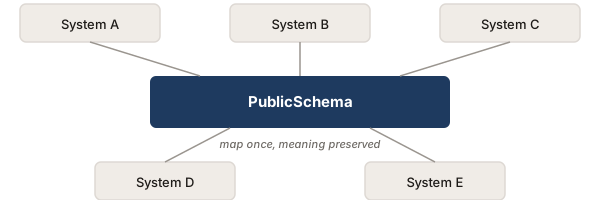
This pattern works for both field names (properties) and value codes (vocabularies).
Step 1: Map your fields to PublicSchema properties
Start by identifying which PublicSchema concept matches the entity in your system. Browse the concepts page or download the Definition Excel for a concept to see all its properties in one place.
For each field in your system, find the corresponding PublicSchema property:
| Your system field | Your type | PublicSchema property | PS type |
|---|---|---|---|
first_name |
varchar(100) | given_name |
string |
last_name |
varchar(100) | family_name |
string |
dob |
date | date_of_birth |
date |
enroll_date |
datetime | enrollment_date |
date |
status |
int (FK) | enrollment_status |
vocabulary |
gps_lat, gps_lon |
decimal | geo_location |
geojson_geometry |
Some things to note:
- Not every field will have a match. Some fields are specific to your system and have no canonical equivalent. That is fine; document the gap.
- Some fields may split or merge. Your system might store a full name as one field where PublicSchema has
given_nameandfamily_nameseparately, or vice versa. - Type differences are expected. Your database might use integers or foreign keys where PublicSchema uses vocabulary codes. The mapping handles the translation.
The concept CSV download gives you a flat list of properties with types and definitions, useful as a starting point for your mapping table.
Step 2: Map your codes to PublicSchema vocabularies
For any field backed by a controlled value set (status codes, gender, document types, etc.), map your codes to the canonical vocabulary. See the Vocabulary Adoption Guide for a detailed walkthrough.
The key output is a code mapping table for each vocabulary:
| Your code | PublicSchema code | Notes |
|---|---|---|
1 |
active |
|
2 |
suspended |
|
3 |
completed |
Your "closed" maps to PS "completed" |
4 |
(unmapped) | Your "archived" has no PS equivalent |
Step 3: Use the mapping for data exchange
Once you have field and code mappings, you can use them in several ways:
Direct data exchange between two systems
System A exports in its own format. A translation layer maps A's fields and codes to PublicSchema properties and vocabulary codes. A second translation layer maps from PublicSchema to System B's format.

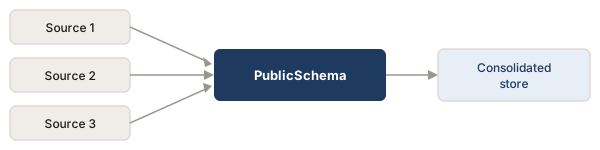
Data consolidation (ETL)
Multiple sources are mapped to PublicSchema's canonical format and loaded into a shared data store:
API federation
Each agency exposes a PublicSchema-aligned API surface. The federation layer queries all APIs using the same field names and vocabulary codes. See the API harmonization use case for a concrete scenario.
Step 4: Validate with JSON Schemas
PublicSchema provides a JSON Schema for each concept. Use them to validate data after mapping and before loading:
import json
import jsonschema

schema = json.load(open("Person.schema.json"))
record = {
    "given_name": "Amina",
    "family_name": "Diallo",
    "date_of_birth": "1988-03-15",
    "gender": "female"
}
jsonschema.validate(record, schema)
Validation catches:
- Fields that did not map correctly (wrong type, missing required context)
- Vocabulary codes that are not in the canonical set
- Structural issues (arrays where single values are expected, or vice versa)
Using the Template Excel for data collection
Every concept page offers a Template Excel download. This is a data entry workbook where:
- Row 1 has human-readable field labels
- Row 2 has the PublicSchema property IDs
- Vocabulary-backed fields have dropdown validation (only canonical codes are accepted)
- Cell comments include property definitions
This is useful when:
- You are collecting data from field teams who work in spreadsheets
- You need a canonical format for data intake without building a custom application
- You want to prototype a data collection form before committing to a system
Data entered in the template is already aligned to PublicSchema, so it can be loaded into any system that has a PublicSchema mapping.
System mappings in vocabulary files
Some vocabularies include pre-built mappings for specific systems (OpenIMIS, DCI, etc.) in their source YAML files. These mappings list each system's codes, labels, and how they map to the canonical codes.
Check the vocabulary pages to see if your system is already mapped. If it is, you can use the mapping directly instead of building one from scratch.
For example, the gender-type vocabulary includes mappings for OpenIMIS and DCI, showing that OpenIMIS uses "M"/"F"/"O" and DCI uses "1"/"2"/"0" for the same canonical values.
See Mapping Example for a full walkthrough of system mappings.
Common mapping challenges
Granularity differences
Your system might have a single "Person" entity where PublicSchema separates Person, Identifier, and Address into distinct concepts. Or vice versa: your system might have separate tables that map to properties on a single PublicSchema concept.
Approach: map fields to the right PublicSchema property regardless of which entity they sit on in your system. The concept boundaries in PublicSchema are semantic, not structural requirements.
Temporal differences
Your system might store a single status field where PublicSchema expects a time-bounded pattern (start_date, end_date, status). Or your system might have a full history table where PublicSchema models a single current state.
Approach: decide whether you are mapping the current state or the full history. For current state, map the latest record. For history, each row maps to a separate PublicSchema record with its own date range.
One-to-many value mappings
Your system uses "inactive" for cases that PublicSchema splits into "suspended," "completed," and "exited."
This is not just a mapping inconvenience; it is an information gap. When you map "inactive" to a single code, you lose the distinction between someone whose benefits are temporarily paused and someone who has permanently exited. Downstream systems that consume the mapped data cannot recover the lost precision.
Approach: if you cannot distinguish between them from your data, map to the broadest applicable code and document the ambiguity. If you can distinguish (e.g., by looking at related fields), add logic to the mapping. The more systems that adopt shared vocabulary codes directly, the less this problem arises.
Missing concepts
Your system has entities that PublicSchema does not cover, or PublicSchema has concepts your system does not implement.
Approach: document the gap. For your extra entities, consider whether they could be modeled as extensions (see Extension Mechanism). For missing coverage, you may not need every concept.
Available downloads
Per concept:
| Format | What it is | Best for |
|---|---|---|
| CSV | Properties with types and definitions | Starting point for field mapping tables |
| Definition Excel | Multi-sheet workbook with metadata, properties, and referenced vocabularies in EN/FR/ES | Understanding a concept in full, sharing with non-technical stakeholders |
| Template Excel | Data entry workbook with dropdown validation | Data collection, prototyping, canonical intermediate format |
| JSON-LD | Concept as linked data | Machine-readable access, RDF toolchains |
Per vocabulary:
| Format | What it is | Best for |
|---|---|---|
| CSV | Codes with multilingual labels and definitions | Code mapping tables |
| JSON-LD | Vocabulary as SKOS ConceptScheme | Programmatic access |
Next steps
- If you only need to align value codes (not field names), the Vocabulary Adoption Guide is a lighter starting point.
- If you are designing a new system from scratch, see the Data Model Design Guide.
- If you want to use JSON-LD contexts or issue verifiable credentials, see the JSON-LD & VC Guide.